The $25 Security Audit That Scored Our Codebase 78 Out of 100
We ran a full ShipShield audit on a real production codebase. Not a test repo. Not a demo. A real Next.js app with Supabase, TypeScript, and actual users.
The result: 78 out of 100 on the risk scale. One critical finding. One high. Three medium. All in two minutes flat.
Here's exactly what happened.
Why We Ran It
Every developer thinks their code is clean. Tests pass. Lint is green. Ship it.
But "clean" in the testing sense and "secure" in the real world sense are two very different things. Tests don't check if someone accidentally committed a .env file three months ago. Lint rules don't flag an npm package with a known vulnerability. CI/CD doesn't care if your auth middleware has a bypass.
We wanted to see what a cold, automated audit would find in a codebase that the team considered "done." Spoiler: it wasn't done.
What ShipShield Actually Checks
Before we get to the findings, here's what a full codebase audit covers. This is everything the free scan can't see because it requires source code access:
- Secrets and API keys in code and git history (not just the current commit, the entire history)
- Dependency vulnerabilities across npm, pip, cargo, and go packages
- Source code analysis for SQL injection, XSS, SSRF, and command injection
- Auth and authorization logic: missing checks, weak JWT config, privilege escalation
- AI powered business logic review for race conditions, input validation gaps, and logic flaws
- Infrastructure security: rate limiting, file uploads, request size limits
- Docker and container scanning for misconfigs and OS level CVEs
- License compliance for GPL/AGPL copyleft detection
- Supply chain analysis for typosquatting and suspicious packages
The whole thing runs in about two to eight minutes depending on repo size. No agent installed. Just connect your GitHub, pick a repo, and go.
The Scan
We connected the repo, hit "Start Audit," and waited. Two minutes and four seconds later, the results were in.
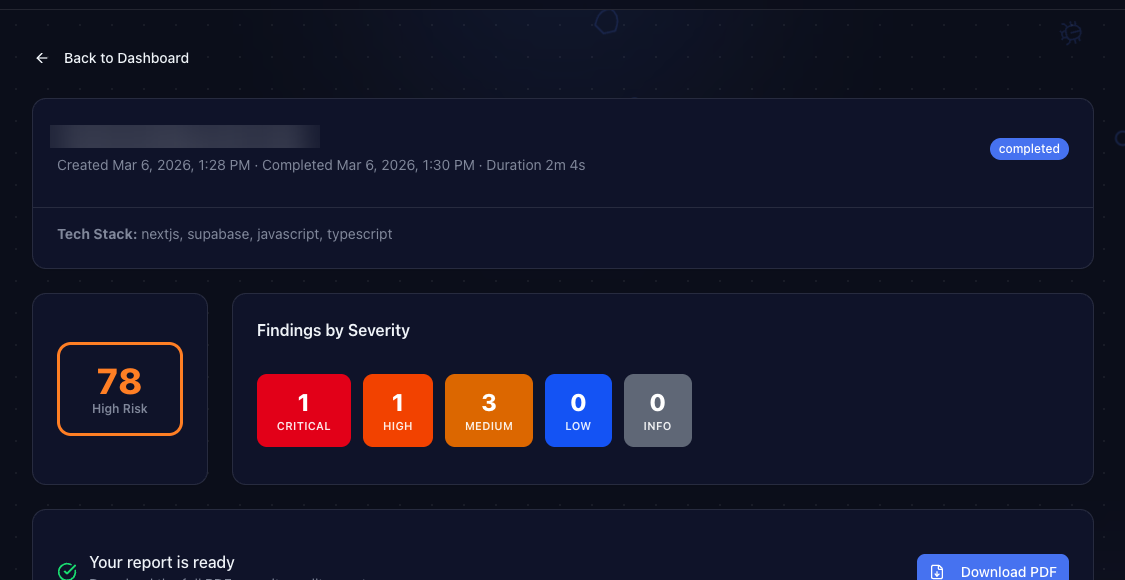
The dashboard showed: 78/100 risk score. High Risk. One critical finding, one high, three medium.
That score was higher than expected. Let's break down what it found.
The Findings
Critical: Exposed Secrets in Git History
This is the one that hurts. ShipShield scans your entire git history, not just the current branch. It found API credentials that were committed months ago, then "deleted" in a later commit.
Here's the thing: deleting a file from git doesn't delete it from history. Anyone who clones the repo still has access to every version of every file ever committed. Those credentials were still live.
"But I deleted the file!" is not a security strategy. If a secret ever touched a git commit, it's compromised. Rotate it.
The fix took about 15 minutes: rotate the keys, update the environment variables, and add the file pattern to .gitignore so it never happens again.
High: Outdated Dependencies With Known CVEs
One npm package had a published CVE (Common Vulnerabilities and Exposures) with a severity rating of 8.1 out of 10. The fix was literally npm update. It had been sitting there for weeks because nobody runs npm audit regularly.
ShipShield flags not just the CVE number but the exact severity, the affected version range, and the minimum safe version. No digging through advisory databases required.
Medium: Missing Rate Limiting
Three API routes accepted unlimited requests with no throttling. An attacker could hammer them with thousands of requests per second. The fix was adding a rate limiting middleware, which took about 20 minutes.
ShipShield identified the exact files and line numbers where rate limiting should be added. Copy the recommendation into Cursor or your editor of choice, and the fix practically writes itself.
The PDF Report
Every audit generates a professional PDF report. It includes every finding with severity ratings, code references, file paths, and AI generated fix suggestions. You can hand it to your CTO, share it with investors, or use it for compliance documentation.
The report is also useful for prioritization. Critical and high findings go first. Medium can wait for the next sprint. Info items are nice to have. ShipShield does the triage for you.
What We Learned
Three takeaways from running this audit:
1. "It works" is not the same as "it's secure." Every finding in this audit existed alongside passing tests and green CI. Security issues live in the gaps between what you test and what attackers look for.
2. Git history is a liability. If you've ever committed a secret, even briefly, it's still there. ShipShield's history scanning caught credentials that the team had genuinely forgotten about.
3. Dependency hygiene matters. Nobody wakes up excited to run npm audit. But one unpatched package with a known CVE is all it takes. Automating this check removes the "I'll do it later" problem entirely.
Your Turn
Start with the free scan. It checks your public facing security in about 10 seconds: headers, SSL, exposed files, DNS, CORS, and more. No signup, no credit card.
If the free scan finds issues (and statistically, it probably will), the full codebase audit goes deeper. It connects to your GitHub repo and scans everything: source code, dependencies, secrets, infrastructure, containers, and your supply chain. Four minutes, $25, downloadable PDF report.
We built ShipShield because we kept finding these issues in our own projects. Now you can find them in yours.
Ship secure. Ship confident.
Secure Your Codebase
ShipShield scans your entire codebase for vulnerabilities, misconfigurations, leaked secrets, and outdated dependencies. Get a full security audit in minutes.